Introduction
I want to share with you a software architecture approach designed to make a project easy to understand and maintain, by both humans and AI agents, while also making application development and maintenance enjoyable.
The main goal of “Luminous” is to provide an architecture (meaning the way things are strategically structured) with a long-term impact and a way of organizing software that is easy to understand and maintain, and that makes software maintenance pleasant.
Development, whether it means building something from scratch or maintaining an existing codebase, should not be frustrating or unpleasant. On the contrary, it should be satisfying and enjoyable. It should give you that sense of satisfaction and pleasure, almost like thinking, “I can’t wait to start building.”
There should also be no fear of touching the code, even after a long time. A developer should feel confident and at ease while developing new feature or while maintaining it.
Context of the problem
The problem to solve is the following: building software that remains maintainable and of high quality over time. We need a highly maintainable project, one that is easy for a newcomer to learn, easy to pick up again after a long time, and that reduces the cognitive load involved in building applications.
We know that software quality is extremely important and must be given proper attention (https://martinfowler.com/articles/is-quality-worth-cost.html); otherwise, over time, it leads to losses in both time and money.
Many developers, CTOs, and companies massively underestimate this aspect and end up paying the price with their money, or their time, or with their mental health or with all of these.
Therefore, having software that is maintainable in the long term is not a debatable choice, it’s essential for the survival of the project.
But that’s not all.
Having software that frustrates developers when they work on it is not acceptable.
When developers feel frustrated, they don’t perform at their best; they don’t work with the same care and effectiveness as when they feel satisfied. As a result, they tend to cut corners or do things just to get them done.
A developer, or a team, should take pleasure in developing and creating software to solve a business problem.
It’s not acceptable for a developer to be afraid of touching the code because they don’t know what might happen. On the contrary, they should feel confident and take pleasure in development. And this should still be true even when they return to the project after a long time.
A well-built project should be structured in such a way that it’s easy to pick up again, even after a long period of inactivity.
It should be easy to understand from start to finish.
The proposed solution: Luminous architecture

What I want to present here is the “Luminous architecture,” an approach to building applications that are simple, maintainable, have low cognitive load, and help reduce technical debt to zero (and keep it there). As already stated in the goal, the aim is to minimize cognitive load as much as possible and make code maintenance enjoyable almost as if you were “playing.”
This architecture combines/takes inspiration by several things:
- Lucid principles, i.e., some principles taken from Lucid Architecture (https://docs.lucidarch.site/principles/)
- Functional composition, a concept found in functional programming (Functional composition is the technique of combining simple, pure functions into a new, more complex function, where the output of one function becomes the input for the next. Like Lego bricks).
- Hexagonal architecture, a style in which inputs and outputs are well segregated from the application’s core domain. So the part the talks to the extern world (both entering your app or going out from it) are isolated.
- FaaS (Function as a Service) – Function as a Service (FaaS) lets you run functions in the cloud only when something happens (an HTTP request, a file upload, a timer, a queue message). You write a small function like
handleOrder()orresizeImage(), You set a trigger (e.g., “when/api/payis called” or “when a file lands in storage”), The platform runs your function on demand, in parallel if many events arrive
- No shared state. Everything that is needed must be passed through function/method signatures, except in cases where some form of singleton is required for shared state (but this should only be used when it’s absolutely unavoidable)

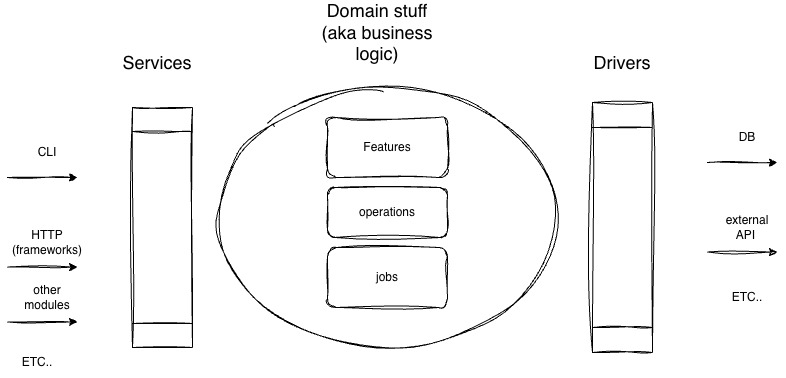
Luminous building blocks
Let’s start with the basic building blocks.
The building blocks used are the following:
- Jobs
- Operations
- Features
- Drivers
- Services
Now we’ll look at them one by one.
Jobs
Jobs are essentially the elements responsible for doing one thing, and one thing only. They must perform a single task. Having more than one reason to change them is not allowed.
This follows the Single Responsibility Principle (a function should have only one responsibility, meaning only one reason to change), and it makes everything easily composable.
In practice, it enables the principle of compositionality (complex behavior emerges from the composition of simple jobs), allowing you to build more complex functionality by combining simple units.
In a sense, they are the smallest unit among the building blocks.
They can be used and chained together to create operations or features (this is the compositionality principle mentioned above).
Jobs:
- can’t call other jobs internally
- can’t call any operation
- can’t call any feature
- can’t call any service of the same module (they may only call services from other modules, but not services within their own module)
- can call Drivers
- can have subfunctions if it’s not reused anywhere else
This constraint helps avoid increased cognitive load and any form of circular flow.
Example of a simple job:
- Calculate price of a product:
'use strict';
function calculateProductPrice({
  basePrice,
  quantity,
  discount = 0,
  vat = 0,
}) {
  if (basePrice < 0 || quantity <= 0) {
    throw new Error('Invalid input');
  }
  const gross = basePrice * quantity;
  const discounted = gross - (gross * discount) / 100;
  const total = discounted + (discounted * vat) / 100;
  return Number(total.toFixed(2));
}
module.exports = { calculateProductPrice };codice esempio
Jobs, as mentioned earlier, can also call drivers to interact with the outside world; alternatively, they can call services from other modules (in the case of a modular monolith).
- call an external API using a driver
'use strict';
const path = require("path");
const httpDriver = require(path.resolve(process.cwd(), "drivers", "httpDriver"));
async function getProductsFromExternalService() {
     let products = await httpDriver.get("https://myproducts.example.com")
     // do any stuff to the product list if needed like filtering
     return products;
}
- Call a database using a driver
'use strict';
const path = require("path");
const DbDriver = require(path.resolve(process.cwd(), "drivers", "mysql"));
async function getProducts() {
     let products = await DbDriver.runQuery("SELECT * FROM Products")
     // do any stuff to the product list if needed like filtering
     return products;
}
Within a single job, the code can be organized into sub-functions (or if it is a object oriented programming language such as Java into methods, preferably static) to achieve the objective. As long as a function or method is used only within that specific job, this is perfectly fine. However, if the same functionality is needed elsewhere in the codebase, that portion of code should be extracted into a new job, and the current job should be promoted to an operation.
- Example of a more complex job organized into multiple functions (in this case I’m using JavaScript, but if I were using classes for example in Java or PHP it could be a static method).
'use strict';
const path = require("path");
const cheerio = require('cheerio');
/**
 * Job: Extract readable text from cleaned HTML
 * Single responsibility: Convert HTML to clean, readable text
 */
async function extractText(html) {
    //=========================
    // Validate input
    //=========================
    if (!html || typeof html !== 'string') {
        throw new Error('Cleaned HTML content is required and must be a string');
    }
    //=========================
    // Load HTML into cheerio for parsing
    //=========================
    const $ = cheerio.load(html, {
        withDomLvl1: true,
        normalizeWhitespace: true,
        xmlMode: false,
        decodeEntities: true
    });

    //=========================
    // Remove unwanted elements
    //=========================
    removeUnwantedElements($);
    //=========================
    //  Remove common semantic elements that are usually navigation
    //=========================
    removeNavigationElements($);

    //=========================
    // extract the text from the body
    //
    // NOTE: $("body").text().trim(), Extracts text content: Gets all the text inside an element, including text from all its child elements
    //Removes HTML tags: Strips away all HTML markup, leaving only the actual text
    //Concatenates nested text: If there are nested elements, it combines all their text content into a single string
    //Handles whitespace: Normalizes whitespace (though you often see .trim() chained to remove leading/trailing whitespace)
    //=========================
    let text = $("body").text().trim();

    return text;
}
module.exports = extractText;
function removeUnwantedElements($) {
    const elementsToRemove = [
        'title',
    ];
    // Remove unwanted elements
    for (const selector of elementsToRemove) {
        $(selector).remove();
    }
}
function removeNavigationElements($) {
    const semanticNavElements = [
        'nav'
    ];
    semanticNavElements.forEach(selector => {
        $(selector).remove();
    });
    // Remove elements by common class/id patterns (navigation, ads, etc.)
    const unwantedPatterns = [
        '[class*="nav"]'
    ];
    unwantedPatterns.forEach(pattern => {
        $(pattern).remove();
    });
}
- Example of a job that uses services from another module.
'use strict';

const path = require("path");
const GetCatalogFromOtherModule = require(path.resolve(process.cwd(), "src", "catalog", "services", "GetCatalog"));


async function getProducts() {

     // in this case we are using the service from a module called "catalog"
     let catalog = await GetCatalogFromOtherModule():
     // do any other stuff

     return products;

}
Be aware to avoid any circular dependency calling other module services. You should only call services from other modules that don’t call the services that uses the job that calls the external module.
Operations
Operations are a collection of jobs grouped together so they can be reused as a unit.
Sometimes a specific piece of functionality requires a sequence of jobs executed one after another.
It’s also common for this functionality to be reused across multiple features.
So how do you bundle this sequence of jobs in a reusable way across different features? You place it inside an operation.
That’s it.
Operations:
- can’t call other operations
- can’t call features
- can’t call services within their own module.
- can use jobs
- can use drivers
- can user services from another module
Operations examples:
"use strict";
const process = require("node:process");
const path = require("node:path");
const getPartyJob = require(path.resolve(process.cwd(), "src", "jobs", "getParty"));
const createPartyJob = require(path.resolve(process.cwd(), "src", "jobs", "createParty"));
/**
 * @param {string} user e.g. "user@example.com"
 *
 * @return {Promise<*>}
 */
module.exports = async function setUpParty(user) {
    // try to retrieve an existing party
    let party = await getPartyJob("mediator");
    // if not found, create a new one
    if (!party) {
        party = await createPartyJob({email: user})
    }
    return party;
};
Features
Features are individual pieces of functionality in your application.
They represent a single application capability (business functionality).
A feature must have a clear, single purpose.
For example, some features could be: adding a new user, accepting a proposal, reviewing a file, accepting a payment, and so on.
If the functionality is simple and is not a complex workflow that would require multiple features, then it is a feature.
You could also say that a feature is a set of operations and jobs used to achieve a specific functionality.
Features:
- can’t call other features.
- can only use operations, jobs, drivers, and, where necessary, services from other modules, in the case of a modular monolith with multiple modules.
Take a look at an example of a feature to register a user:
const { findUserByEmail } = require('../jobs/findUserByEmail');
const { hashPassword } = require('../jobs/hashPassword');
const { insertUser } = require('../jobs/insertUser');
/**
 * Register a new user
 * @param {string} email - The user's email address
 * @param {string} password - The plain text password
 * @returns {Promise<object>} - A promise that resolves to the created user data
 */
const registerUserFeature = async (email, password) => {
    // Check if user already exists with this email
    const existingUser = await findUserByEmail(email);

    if (existingUser) {
        throw new Error("Email already registered");
    }
    // Hash the password before storing
    const hashedPassword = await hashPassword(password);
    // Insert the new user into the database
    const result = await insertUser(email, hashedPassword);
    return {
        id: result.lastID,
        email: email,
        message: 'Registration successful'
    };

};
module.exports = { registerUserFeature };
Drivers
As already mentioned with the concept of drivers, this is somewhat similar to the concept of ports in Hexagonal Architecture (see here).
Drivers are essentially the parts of the codebase that allow your application to communicate with the outside world.
They are the interface to the external world.
They live outside the domain logic.
A driver is anything that allows your application to communicate with the external world (database, APIs, LLMs, etc.).
For example:
- the database connection and query execution;
- the Redis connection and command execution;
- the
httpdriver used to perform HTTP requests.
A driver must not use other drivers.
Here you are an example of code for a driver that communicates with SQLite and do query execution:
'use strict'
const path = require("path");
const sqlite3 = require('sqlite3').verbose();
const DB_PATH = path.join(process.cwd(), 'mydb.db')
const db = new sqlite3.Database(DB_PATH, (err) => {
    if (err) {
        console.error("Error while opening db:", err.message);
        return;
    }
});
module.exports = {
    run: async function(sqlStatement, params = []) {
        return new Promise((resolve, reject) => {
            db.run(sqlStatement, params, function(err) {
                if (err) {
                    reject(err);
                } else {
                    resolve(this);
                }
            });
        });
    }
};
To use this driver in client code, you will need to do the following:
'use strict';
const db= path.join(process.cwd(), 'drivers', 'sqlite')
async function updateWorkflowRequest(workflowId, data) {
   ....

    const updateSql = `
                UPDATE workflow_requests
                SET ${setClause}
                WHERE id = ?
            `;
    .....
    // here is the use of the driver
    const result = await db.update(updateSql, params);
    ...
    return result;
}
module.exports = updateWorkflowRequest;
The Services
Services are the entry point from the external world into your core application.
It is the unit of a business request.
They represent a complete business request (for example: a complete HTTP request if your service is an API or web application, the complete execution of a CLI command, a complete execution processed by a queue consumer, and so on). And by business request, I mean a request that can be initiated by a client, causes your application to perform some action, change some state, and produces a result.
In other words, they are the entry point or point of contact with the outside world. And by “outside world,” I mean both HTTP frameworks, which will use services from controllers, and CLI programs that will use a service to execute a specific functionality, as well as other modules inside your application if you have a modular monolith and modules need to communicate with each other.
For example, if one module needs functionality from another module inside one of its jobs, then it will call the service, and only the service. It cannot call the jobs, operations, or features of another module directly; otherwise, it would create tight coupling and significantly increase dependencies between modules.
You should think of it this way: it is the functionality you want to expose to the outside world.
The concept of a service is, in some ways, similar to Function as a Service (https://kinsta.com/blog/function-as-a-service/ ).
A service is what you expose to the outside world.
Services are the only component exposed by our projects to the outside world. Every other function (features, operations, jobs) is not directly available from outside; instead, they are used internally by services.
In any case, the entry point is where external inputs are collected and then passed to the service. For example, in a Fastify Node.js route, the route extracts inputs from the request object and then calls the services.
A service:
- can’t call other services in the same module
- can call features, operations, jobs and drivers
- can use services from other modules
Services can be composed of:
- a single feature;
- multiple features;
- jobs;
- operations.
In short, a service is a composition of the other building blocks used to achieve a result. This composition is callable from the outside world through HTTP calls, CLI commands, AMQP consumers, or whatever interface you need.
Examples of services:
CropImage
AddNewUser
ChangeBookAttributes
SaveFile
AddPointsToUser
etc.
Here you are an example of a service composed of a single feature:
"use strict";
const path = require("path");
const GetUserInfo = require(path.resolve(process.cwd(), "src", "features", "GetUserInfo"));
 module.exports = async function GetUserInfoService(input) {
    // a service may call another feature, or operation, or job to accomplish what is needed
    let data = await GetUserInfo("user@proton.me");
    return data;
}
module.exports = GetUserInfoService;
Example of a complex service calling more elements (in this case jobs, operation, and two features)
"use strict";
const path = require("path");
const ExtractEmailFromPayloadJob = require(path.resolve(process.cwd(), "src", "jobs", "ExtractEmailFromPayload"));
const ValidateEmailOperation =require(path.resolve(process.cwd(), "src", "jobs", "ValidateEmail"));
const GetUserInfoFeature = require(path.resolve(process.cwd(), "src", "features", "GetUserInfo"));
 module.exports = async function GetUserInfoService(payload) {

     // here we extract the email from the payload since the payload is a json object with several attributes
     let email = ExtractEmailFromPayloadJob(payload);
    // than we need to validate the email to check if everything is ok
     ValidateEmailOperation(email);
    // a service may call another feature, or operation, or job to accomplish what is needed
    let data = await GetUserInfoFeature("user@proton.me");
    // here we want to log what we did
    EmitEventFeature("user data taken", data)
    return data;
}
module.exports = GetUserInfoService;
NB: I used “Job”, “Feature”, etc… as suffix but you can avoid that if you want.
Even if services and features seems they same they are different:
- Feature: Represents a single capability
- Service: Exposes capabilities to the outside world, can orchestrate multiple features, and represents a full business request
In some cases, a service and a feature may coincide.
The folders structure
The following is the folder structure of a project using Luminous:
/my-app /framework-related-stuff /src /drivers /services /features /operations /jobs /tests
That’s it. As simple as that.
The /src folder
The /src folder is the directory that will contain our application logic.
Inside it, there should only be domain logic. Only services, features, operations, jobs and drivers (though drivers folder could go outside of the /src, it’s not mandatory to have drivers folder inside it).
I mean it should contain only code related to the features and the domain we are working in.
For example, if our domain is banking, this is where we would place the code responsible for handling transactions, enforcing invariants, performing calculations, and so on.
In other words, nothing related to the framework being used, or related to other stuff, should enter /src.
For instance, if we are using the fastify framework, nothing from Fastify should appear inside src (no hooks, nothing at all).
Framework-related code must remain outside the /src folder. Why? Because this way we are not tied to the framework in any way, and we could even run our application through a CLI.
Modular Monolith with Luminous
if you wanted to create multiple modules within a project, the suggested folder subdivision/structure would be:
/src
   /drivers
   /shared
       /jobs
       /operations
   /moduleA
      /services
      /jobs
      /operations
      /features
   /moduleB
     /services
     /jobs
     /operations
     /features
   /...
In practice, each module has its own subdivision into services, jobs, and operations.
We also have a module called shared, where we can place only useful elements that are not tied to the business and can be used by multiple modules. For example: utility functions/classes for working with arrays, file systems, strings, numbers, and so on…in short, anything that is not related to the domain.
Of course, this will couple the modules through the shared module. However, since it contains no business logic, if one day we wanted to move from a modular monolith to a service-based architecture or microservices architecture, we could move the shared logic into the appropriate service or microservice.
It is also true that if you introduce a bug in shared, all modules will inherit that bug. This is where the trade-off comes into play between duplicating code across the various modules for those operations or having a single central point.
In other words, the shared module is effectively like an external library. So all the same considerations that apply to external libraries apply here as well.
Other considerations and advices
- You can organize things inside
jobs, and so on, however you prefer.
Inside the jobs, operations, features, or services folders, you are free to structure things in whatever way makes the most sense for you.
For example, you might want to organize jobs that operate on files inside a file folder within the jobs directory. Or you might want to place jobs that work with strings inside a strings folder.
/src
    /jobs
       /files
       /strings
....
- Keep framework-related code outside the
/srcfolder.
Never put anything from any framework inside /src.
Only business-domain code should go inside /src.
- Domain-Driven Design
You can also use some Domain-Driven Design concepts inside jobs and operations, as subfolders. For example, you might create a folder inside jobs called anticorruption.
For entities or value objects, however, I would suggest creating a folder at the same level as drivers, jobs, operations, and so on.
- If you need to use multiple services to complete a complex or multi-domain workflow, you can encapsulate everything inside
workflows.
In practice, you can wrap the entire process inside files located in a folder called workflows.
In a modular monolith, this folder sits at the same level as the modules themselves. So, for example, in a finance-related modular monolith, it would be placed alongside Customers, Payments, or any other <module_name>, for example:
/Workflows
/drivers
/Customers
   /jobs
   /operations
   /features
   /services
/Payments
   /jobs
   /operations
   /features
   /services
/Shared
   /jobs
   /operations
Workflows call multiple services to execute a complex workflow. They can use only services, drivers, and, in the case of a modular monolith, anything located in shared.
They cannot directly use the features, operations, or jobs of individual modules.
- If you use object-oriented languages, try to always use static classes.
If you want to implement Luminous using object-oriented languages such as Java or Scala, try to favor static classes instead of instances. This helps avoid state as much as possible (the this keyword, so to speak).
Why avoid state? Because managing state can become costly in terms of cognitive load. For example, you may not easily know where the state is being changed during the application’s execution. You may also not know when an attribute is being set through this.
- Pass only the bare minimum required for a job, operation, and so on to perform its task.
Only pass what is actually needed. Do not pass unnecessary data. For example, if only the email address is required, do not pass the entire user object—just pass the email.
- Use clean code concepts.
Give variables, jobs, features, and so on meaningful, self-explanatory names. Do not use short names or names that do not reflect their actual meaning. Think of code as a book that should be read smoothly, without forcing the reader to stop.
- Use meaningful comments.
Comment your code properly. Write comments that explain why a particular choice was made and include the necessary context to reduce cognitive load. Write comments as if you were explaining things to your future self when you come back to work on the code later.
- Separate sections of code using blocks.
Visually separate sections of code into cohesive blocks, where closely related elements are grouped together, making it easier to navigate from one part to another.
- Document sufficiently.
Use ADRs to document decisions. Document workflows. Document the concepts that are important to the business. Document step by step the things that need to be carried out.
- Test the software.
Add different types of tests to your code: integration/functional tests with frameworks like Cucumber, unit tests, end-to-end tests, and acceptance tests.
- You can have a layer that talks to libraries
A folder called libraries, or something similar which communicates with external libraries in a way similar to what we do with drivers.
In practice, this layer wraps the library and gives you access only to what you need, so your business logic always talks to that layer, and you can swap out any underlying library later, similar to the Repository Pattern.
If you do not want to create a libraries folder, you can place this inside drivers, because in the end it is still communication between your business logic and the external world.
- Add observability inside the code
For example, add tracing for calls to jobs, operations, features, including inputs and outputs. Example:
await emitTrace('[running] initializing redis vector db');
await redisVectorDb.initialize();
 await emitTrace('[finished] redis vector db initialized');
Yes, the code will become more verbose, but it will be much easier to debug, especially when using AI coding agents.
You can do this by logging to a SQLite table.
Also log what enters your system as input and what leaves it as output. A kind of requests logs.
FAQ
- How can I use Luminous in a microservices architecture?
Each microservice is structured using Luminous and communicates via your chosen protocol (HTTP, AMQP, gRPC, etc.).
- How can design patterns, such as Strategy, be integrated into this architecture?
You need to take the core concepts and translate them into jobs, operations, features, etc.
With some design patterns this is easy. With others, it is a bit more difficult.
- Where should I put my application’s entry point? Inside
src?
No, your application’s entry point should be placed outside the src folder. It can be directly under the application root folder, inside a public/ folder, or within a server/ folder (if it’s an API, for example).
In short, you can place it wherever is most convenient for you.
- What’s the difference between a service and a feature?
So, let’s say that services serve two purposes:
To group multiple features together and create a complex workflow that requires several features.
To communicate with the outside world as incoming entry points to your application.
So there may be a service with only a single feature (in that case, the service and the feature effectively overlap), but there can also be cases where multiple features are needed to fulfill a business request.
Final considerations
This architecture was born after designing and developing a large number of projects, experimenting with different architectures, implementations, and concepts. It was then refined with the help of a colleague of mine, Simone Sacchi, and through feedback from several other colleagues.
It essentially started from the Lucid implementation, and then I added other concepts learned and applied throughout many projects of varying sizes (from personal side projects, to simple and medium-complexity projects, all the way to enterprise projects generating tens of millions of euros in revenue).
Haiaty Varotto
For an scaffolding project with examples (in Nodejs) see here:
Leave a Reply